Room booking for municipalities

Let associations book the community hall, gym and club rooms online

Associations see when a room is free and submit the request themselves. The municipal office confirms with one click; confirmation and access run automatically. We set up Schedulify to your processes – personally, from Nenzing, Austria.

How it works

From the association's request to an open hall

This is how a room is assigned with Schedulify – without phone calls, paper slips and spreadsheets.

  1. 01

    The association submits a request

    On the municipality's booking page the association picks the room, day and time slots – several hours in a row if needed. The price is shown immediately.

  2. 02

    The administration approves

    The request arrives at the municipal office with a note and contact details. Confirm, reschedule or cancel – one click. Rooms such as the meeting room can also be bookable directly.

  3. 03

    The confirmation goes out

    The association automatically receives an email with a calendar entry and, if you wish, a reminder the day before. The booking appears in the municipality's calendar.

  4. 04

    Access is taken care of

    With a connected access system the association gets access for the booked time, for example via QR code – no key handover. We set up this connection individually.

What it looks like

Real views from Schedulify

Not an illustration but the software as it runs for a municipality – shown here with a demo municipality with five rooms and the usual associations.

  1. 1The association

    See free times and submit a request

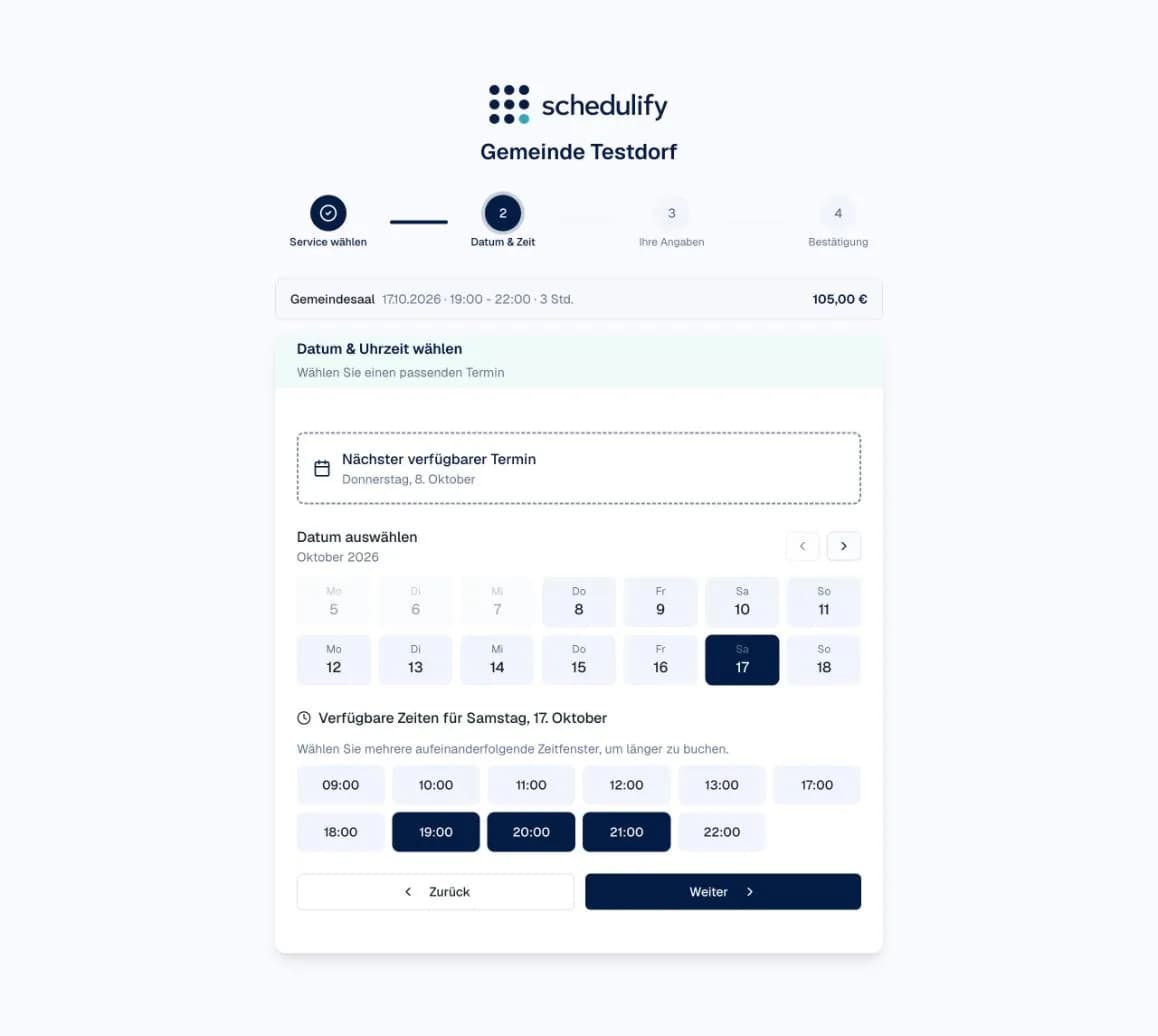
    The brass band picks the community hall, the Saturday and three consecutive hours. Occupied times are missing from the selection, the total price is shown right away. All it takes is a name and an email address.

    Booking page: date and several consecutive time slots for the community hall with total price
  2. 2The administration

    Check the request and confirm with one click

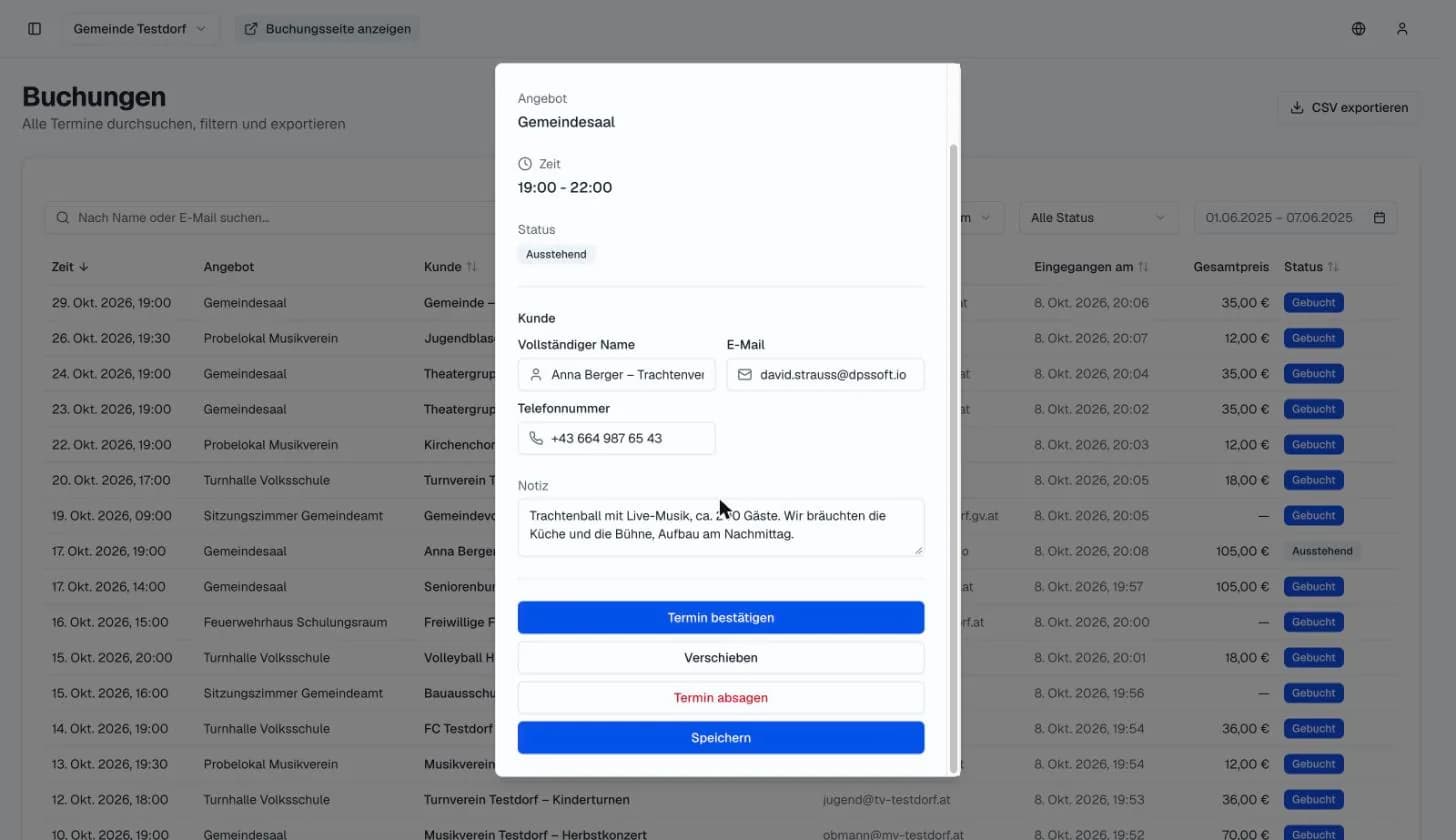
    The request arrives with a note (“ball with live music, 200 guests, kitchen and stage”) and a phone number. The office confirms, reschedules or cancels – the association is informed automatically.

    Administration: an association's request with note and buttons to confirm, reschedule or cancel
  3. 3The administration

    Occupancy, rate and status at a glance

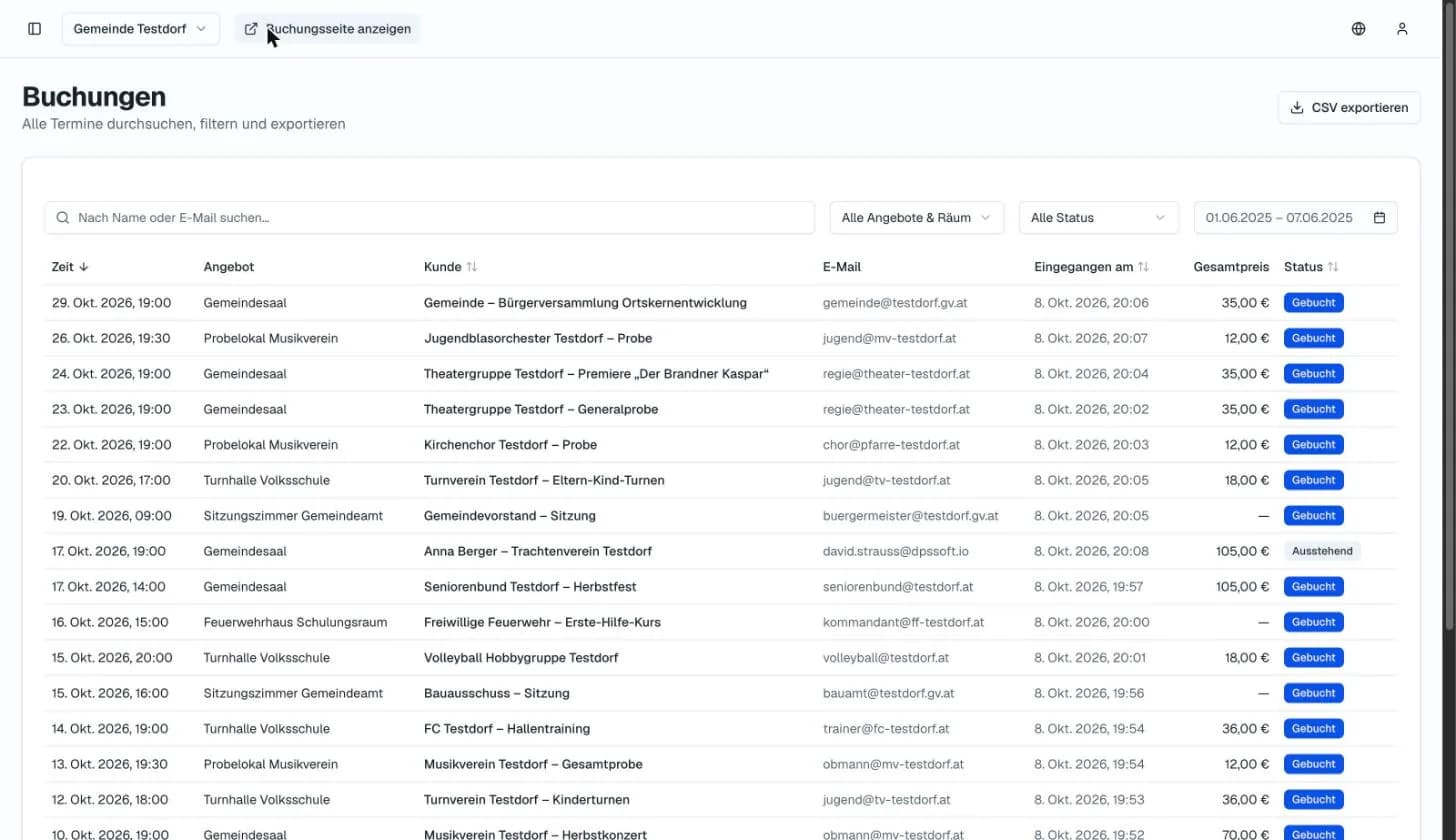
    All bookings with room, association, total price and status in one list – filterable by room and period, exportable as CSV for invoicing.

    Administration: list of all bookings with room, association, total price and status
  4. 4The administration

    One calendar for all rooms

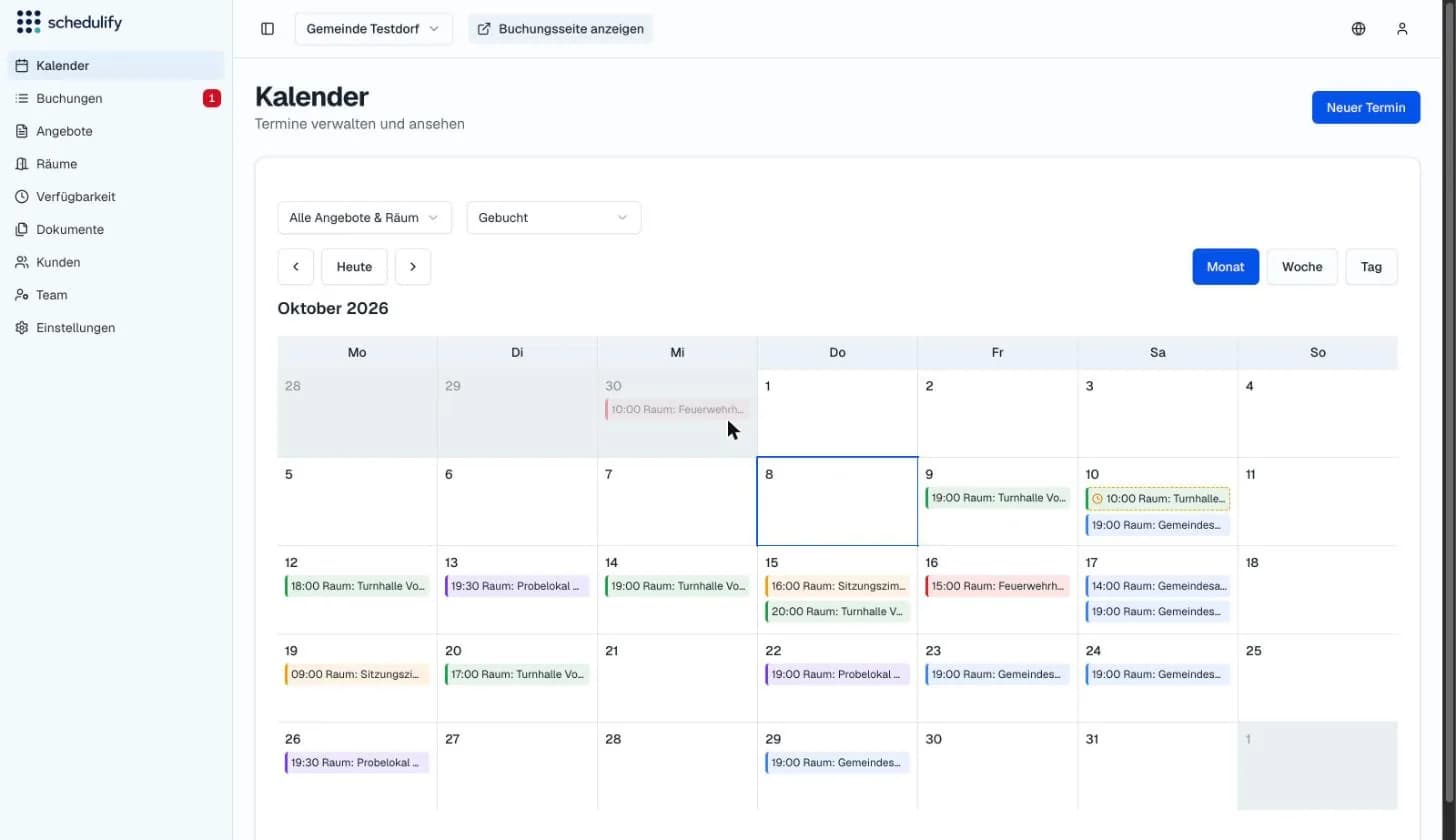
    Month, week or day view, each room in its own colour. Pending requests are marked, and the administration enters its own events directly.

    Administration: monthly calendar with occupancy of all rooms and one pending request

Scope

What is there right away, what we set up, what is individual

So you know what you get – and what we build together with you.

Available right away

Part of the room booking package, working from day one.

  • Rooms with their own times, blocked periods and rules
  • Request with approval or direct booking – configurable per room
  • Price per hour and total price on the booking page
  • Confirmation, cancellation and reminder emails with calendar entry
  • Calendar for the administration, booking list, CSV export
  • Booking page in German and English

Set up by us

Configured to your processes, with training for your staff.

  • Association accounts and user groups – only invited associations or everyone
  • Roles for the municipal office, works yard and hall caretaker
  • House rules as a mandatory checkbox before booking
  • Embedding in the municipality's website
  • Notifications to the departments in charge

Individual integration

For municipalities with existing systems – as part of Schedulify Enterprise.

  • Access system and QR codes for the booked time
  • Rates per user group, flat rates for frequent users
  • Interfaces to invoicing and existing software
  • Dedicated server, custom reports

Cost

What room booking costs for your municipality

The room booking package is available on its own or in addition to Basic, Pro and Enterprise. Because every municipality has different rooms and processes, we quote the price after a short conversation – within one business day, in writing.

Enquire about room booking

The price depends on

  • Number of rooms and locations
  • User groups and approval workflows
  • Integrations: website, access control, existing systems
  • Onboarding and training – online or on site

Example scope

  • 5 rooms: community hall, gym, rehearsal room, meeting room, fire station
  • around 20 associations with their own access, approval by the municipal office
  • booking page embedded in the municipality's website
  • setup and training of two staff members, then personal support

Setup and training are charged once, operation monthly. Basic and Pro can be cancelled monthly; room booking and Enterprise have an agreed term. All prices net.

Personal support

Operated securely. Supported personally.

From setup to day-to-day operation, we look after your project personally – as a small team from Vorarlberg, Austria. Setup, training and support are done by us, with no hotline and no ticket system.

Your contacts

  • DS

    David Strauß, BSc

    Founder, development

  • AO

    Dipl.-Ing. Andreas Olschnögger

    Founder, development

More about us
  • GDPR-compliant hosting on servers in Germany

  • Individual setup and configuration

  • Integration of existing systems

  • Testing and documentation

  • Training for the staff in charge

  • Support at launch

  • Maintenance, security updates and monitoring

  • Personal support

FAQ

Frequently asked questions

Any other questions? Write to us.

Shall we show you with your own community hall?

30 minutes online, using your rooms and associations as the example. Afterwards you know whether Schedulify fits your processes.